
…or is it just you?
Have you ever tried to access your favorite website, only to be met with a frustrating “This site can’t be reached” message, or worse, a blank screen? Is the website truly down, or is something amiss with your internet connection?
Before you start unplugging your router or calling your internet provider, here are some simple steps to take to help you find out.
This article includes a website you can use to determine if your favorite site is down for everyone.
More Info:
Downdetector.com
A site to help you determine if your favorite site is truly down
Isitdownrightnow.com
Another site which checks the status of websites

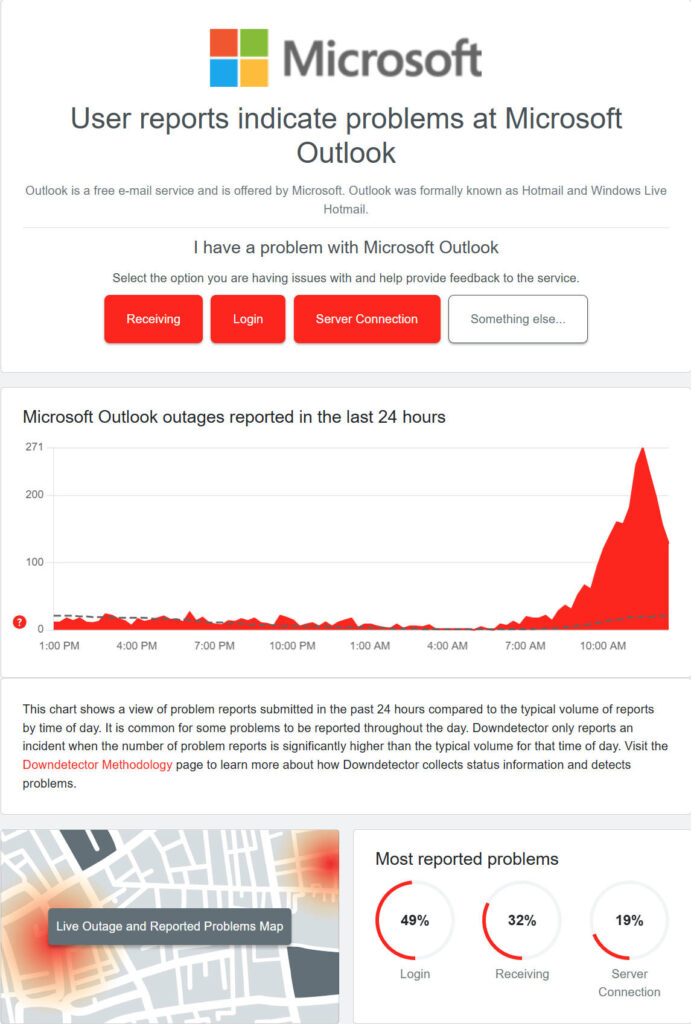
Downdetector (https://downdetector.com): By entering your favorite website’s URL, this platform will attempt to reach it from various global locations, providing real-time information about your website’s status. It gets this information by aggregating user reports from various sources, including Twitter (or whatever it’s calling itself these days). It can be particularly useful for major work and social media platforms, streaming services, providing a visual map of reported outages. The visual map helps determine if your geographic location is being impacted by the outage.
If your favorite website seems to be unreachable, there could be several issues causing the problem. As with any somewhat complex issue, you will want to isolate the problem by narrowing down the variables. Here are the simple steps I recommend taking when you are unable to reach a website.
Here are some key actions you can take:

Reboot your computer
Yes, rebooting can solve a whole lot of problems, even this one.
Test another website
Enter the URL (website address) for another site, preferably a large site with many servers such as https://amazon.com or https://google.com. If these sites come up, then you know that your internet is working, and can check that off your list.
Test with another browser
Open a second browser (you do have more than one browser installed, don’t you?) and try entering a URL there. If your favorite site comes up, then you have a problem with your first browser… typically clearing its cache will solve this. If you don’t have a second browser installed, you can also try accessing it from your phone or a different computer.



If other sites come up in your first and/or second browser, but your favorite site does not, then the issue could still be on your end, but it is much less likely.
Next check an online service designed to tell you if a website is experiencing a widespread outage: such as https://downdetector.com
If you have questions about this, please let us know and we will be happy to assist you.
Take care,